

Latest Version
Ryo Nakano
Media
Linux
Free
com.github.ryonakano.reco
Report a Problem
More About Reco
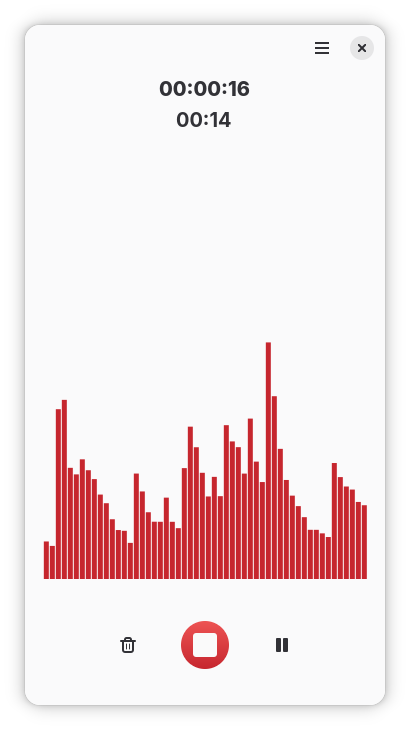
Capturing audio on a Linux system is often more complicated than it needs to be, frequently requiring users to navigate complex mixer settings or bulky production suites just to record a simple conversation or voice memo. The Reco audio recorder solves this common frustration by stripping away unnecessary complexity, providing a clean, purpose-built interface designed solely for hassle-free sound capture.
What is the Reco Audio Recorder?
Developed by Ryo Nakano, Reco is an elegant, open-source utility built specifically for the Linux platform. Categorized under media utilities, its primary strength lies in its absolute focus on simplicity. Whether you need to dictate quick thoughts, preserve an improvised musical melody on your instrument, or capture an online discussion, this lightweight tool handles the task without getting in your way.
Key Features of the Reco Audio Recorder
Despite its minimalist design, the application includes a thoughtful set of features tailored for everyday productivity:
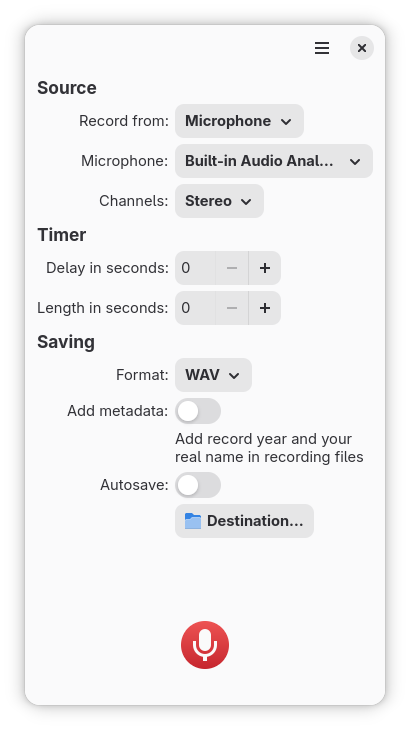
- Dual-Source Recording: You can record input from your microphone and your system audio simultaneously. This makes it an excellent choice for saving online calls, video conferences, or streaming media.
- Versatile Format Support: Save your final files in the format that best fits your workflow. The app natively supports ALAC, FLAC, MP3, Ogg Vorbis, Opus, and WAV.
- Timed Captures: Set a delay timer of up to 15 seconds before the recording starts, and automatically cap the duration up to a maximum of 600 seconds.
- Automatic Metadata: Keep your audio library organized effortlessly by letting the application automatically append artist and year metadata to your files.
- Fail-Safe Saving: Never lose your progress. If the application is closed unexpectedly while recording, your audio is either saved automatically or you are prompted with a file dialog, depending on your custom preferences.
Who is This Utility For?
The Reco audio recorder is ideal for Linux users who value speed and reliability over complex editing suites. It is perfect for students recording lectures, content creators capturing quick voiceovers, and professionals archiving virtual meetings. By offering both manual and automatic directory saving, it fits seamlessly into any digital filing system.
To try this streamlined recording utility on your Linux distribution, visit the official Flathub store page to explore its features and integrate it into your system.
Rate the App
User Reviews




Popular Apps










Editor's Choice